Purpose: This page provides guidance for entering results from the Minnesota Feedlot Annualized Runoff Model (MinnFARM) pollution reduction estimates in eLINK.
Background
Feedlot projects will use MinnFARM to estimate reductions in annual pollutant loading. The most current version of the model (Excel spreadsheet), the MinnFARM user guide, and a MinnFARM Overview (narrated PowerPoint) are provided at the following website: www.manure.umn.edu/applied/open_lots.html.
Getting Started
Before entering information into eLINK, the user must first run the MinnFARM feedlot evaluation model twice to represent the project before and after the installation. The difference between those two scenarios is reported as the pollution reduction. For example:

Figure 1: MinnFARM Model Outputs Before BMP Installation

Figure 2: MinnFARM Model Outputs After BMP Installation

Figure 3: Example MinnFARM Pollution Reduction Calculation Derived from Figures 1-2 and 1-3 Data

How to Enter Pollution Reduction Estimates
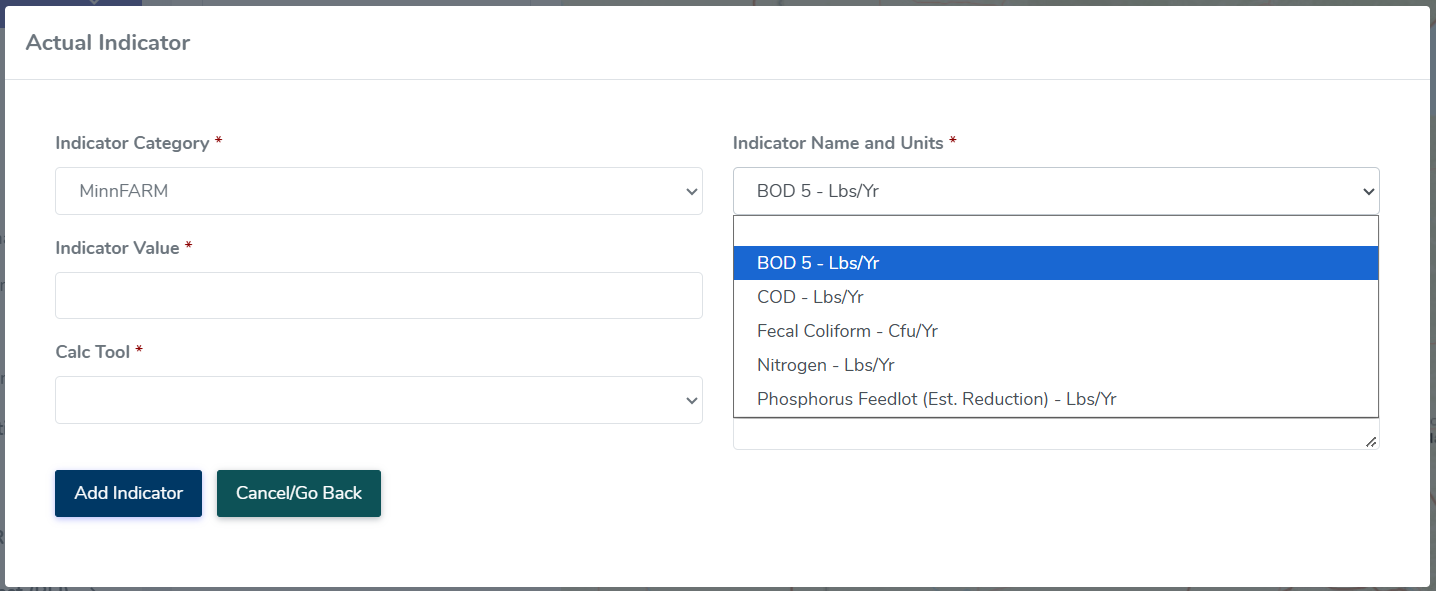
Use the eLINK Guidance Document Managing Activities to navigate to the Activity Details page for your feedlot project. Click Add Indicator to complete indicator information, also known as pollution reduction estimates.
All five of the indicators reported by MinnFARM must be entered: phosphorus, nitrogen, chemical oxygen demand (COD), fecal coliform, and five-day biological oxygen demand (BOD 5).
- Click the Add Indicator button to add final annual pollution reduction estimates for your feedlot project.
- Indicator Category: select MinnFARM from the dropdown list. This will filter the available indicators in the next field.
- Indicator Name and Units: select the specific MinnFARM indicator name, e.g. BOD5.
- Indicator Value: enter the value consistent with estimate for this indicator.
- Waterbody: enter the waterbody the indicator is intending to address
- Calc. Tool: select MinnFARM again.
- Comments: enter additional information about the calculation or describe any assumptions used in calculating the indicator information that may be helpful in future analysis, if applicable.
- Click the Add Indicator button at the bottom of the window. Repeat the process for each of the indicators reported by MinnFARM (Phosphorus, Nitrogen, COD, Fecal Coliform, BOD 5).